AI fields
Let a model fill a column: summaries, categories, numbers and dates from your records, with your own key.
Turn a text, select, number, date or checkbox field into an AI field. Write a prompt that names other fields, and each record gets its answer in the background, updated when its inputs change.
- Your own key for Anthropic or any OpenAI-compatible service: OpenAI, DeepSeek, Qwen, Kimi, Zhipu, OpenRouter, Gemini or a local Ollama; Workers AI without a key on Cloudflare
- Templates to summarize, translate, extract, classify, tag, judge sentiment and write copy; a preview before you save
- Answers as text, a choice from your options, a number, a date or a checkbox; images from attachment fields for models that read them
- Generated in the background, at most 6 calls at once, with retries; cells you type over stay yours
- An AI generate step in automations, and AI fields over MCP
72 of 72 automated tests pass in 11 files (2026-10-21).
Verification record
The test method and results below are the project's own record, kept next to the code and published unedited.
AI fields: verification record
Date: 2026-10-14. Feature: part 5 of the feature expansion (spec).
What was tested
- Workspace AI services: Anthropic, any OpenAI-compatible service with its own address (presets for OpenAI, DeepSeek, OpenRouter, Qwen, Kimi, Zhipu, Gemini and Ollama), and Workers AI when the server has the binding. Keys encrypted with
SECRET_KEY, only their last four characters shown, owners only, a test call, monthly call counts. - AI settings on seven field types: single line text, long text, single select, multiple select, number, date and checkbox. Prompts refer to other fields by name, can send images from attachment fields, and start from templates (summarize, translate, extract, classify, tag, sentiment, write copy). A preview runs the prompt on the first record without writing.
- Background generation: new records and changed inputs queue cells (2 second debounce, unchanged inputs skipped), at most 6 calls at once per base, retries after 10 s, 1 min and 5 min, a rejected key pauses that service’s cells, a missing service or an ended trial pauses instead of failing, the Workers AI monthly quota, AI fields that read other AI fields wait for them.
- Cells typed by hand stay as typed until someone chooses Regenerate; answers that arrive after an edit, a stop or a delete are dropped.
- Answers that do not fit the field (an option that does not exist, text where a number belongs) show as errors with the model’s own words.
- Regenerate a cell, selected records or a whole column, generate missing records, stop; progress in the column header; states in the grid and the record view.
- The automation step “AI generate” with text or JSON answers.
- MCP:
aioptions increate_table,create_fieldandupdate_field,list_ai_services,generate_ai_field, and AI steps in automations. REST: status, generate, stop and preview. - Safety: service addresses must be
https://and must not point at private networks (unlessAUTOMATION_ALLOW_PRIVATEis set), including host names that resolve to private addresses in the Docker image; redirects are not followed; keys never leave the server.
How
- Unit tests (Vitest, Node): prompt references (field names to ids and back, braces that are not field names), prompt expansion and the 32,000 character cut, answer parsing for every output type, the instruction per output type, and the request and answer formats of Anthropic, OpenAI-compatible and Workers AI, including images, reasoning models that think before answering, answers cut off by the token limit, and the mapping of 401, 403, 429 and 5xx.
- Worker integration tests (Vitest in workerd with real Durable Objects, SQLite and D1): services and permissions, field validation (unknown fields, self references, cycles, image fields, 20 per table), queueing inside writes, edited cells, imports, a 1,000 row paste, whole columns, deletes, the engine with a fake model (late answers, retries with
Retry-After, rejected keys, missing services, quota, trial, dependency order, at most 6 calls at once), the REST routes, the automation step and the MCP tools. - UI checks with Playwright against
wrangler devon a base made from the CRM template, with a real DeepSeek key (modeldeepseek-flash, DeepSeek-V4.1-Flash, which reads images; the key belongs to the project owner and is not in the repository) and a local fake OpenAI-compatible model that answers after 1 second (a test tool, not part of the repository). - Docker runtime check:
docker/server.mjswith fresh data directories, with and withoutAUTOMATION_ALLOW_PRIVATE. - Bench:
npm run bench, 50,000 rows, with two auto-updating AI fields on the table; and a 1,000 record column generated against the fake model.
Results
Tests: 72 of 72 AI tests passed in 11 files (npm run verify, 2026-10-14). The whole suite: 606 of 606.
Bench (local wrangler dev, Apple M5 Pro, Node v24.18.1, 50,000 rows). Other heavy programs were running on the machine during this run (load average about 31), so all numbers in it are several times slower than in the earlier records; compare the rows with each other:
| Action (same run) | ms |
|---|---|
| Edit a cell + rollup update | 1.20 |
| The same edit with 2 auto-updating AI fields on the table (cells queued) | 0.80 |
| Paste 1,000 rows and delete them | 132 |
| The same paste with 2 AI fields (2,000 cells queued) | 121 |
Queueing AI cells adds no measurable time to a write.
Generation (fake model, 1 second per answer): a column of 1,003 records was generated in 171 seconds, with at most 6 calls at once and no errors (the design expects about 1,003 / 6 = 167 seconds).
Edit to answer with DeepSeek: changing a deal’s amount until its AI priority was written back took 3,216 ms (median of 5: 3,002 to 3,318 ms), of which 2 seconds is the debounce that merges quick successive edits.
UI scenarios
| Scenario | What was checked | Result | Screenshot |
|---|---|---|---|
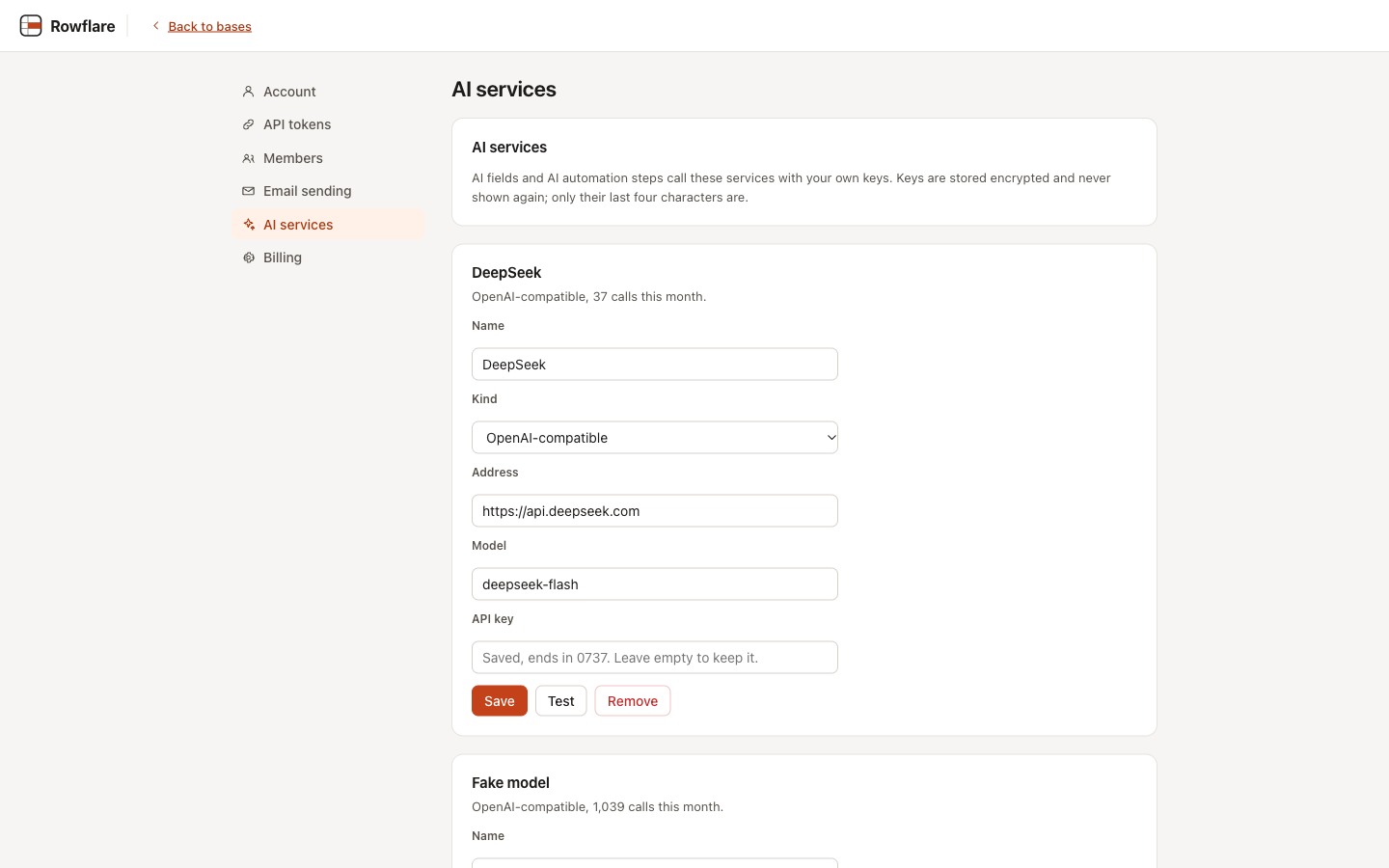
| AI services | DeepSeek added from its preset with the key; Test answered “OK”; the saved card shows only “ends in 0737” and the month’s calls (37 for DeepSeek, 1,039 for the fake model) | Pass | settings |
| Write copy | “Pitch” on Companies from the Write copy template; the preview showed DeepSeek’s text; on save “Generate for 12 existing records?” filled all 12; “Regenerate all” showed Generating for 6 cells and Waiting for the rest, and “Pitch (0 of 12)” in the header | Pass | |
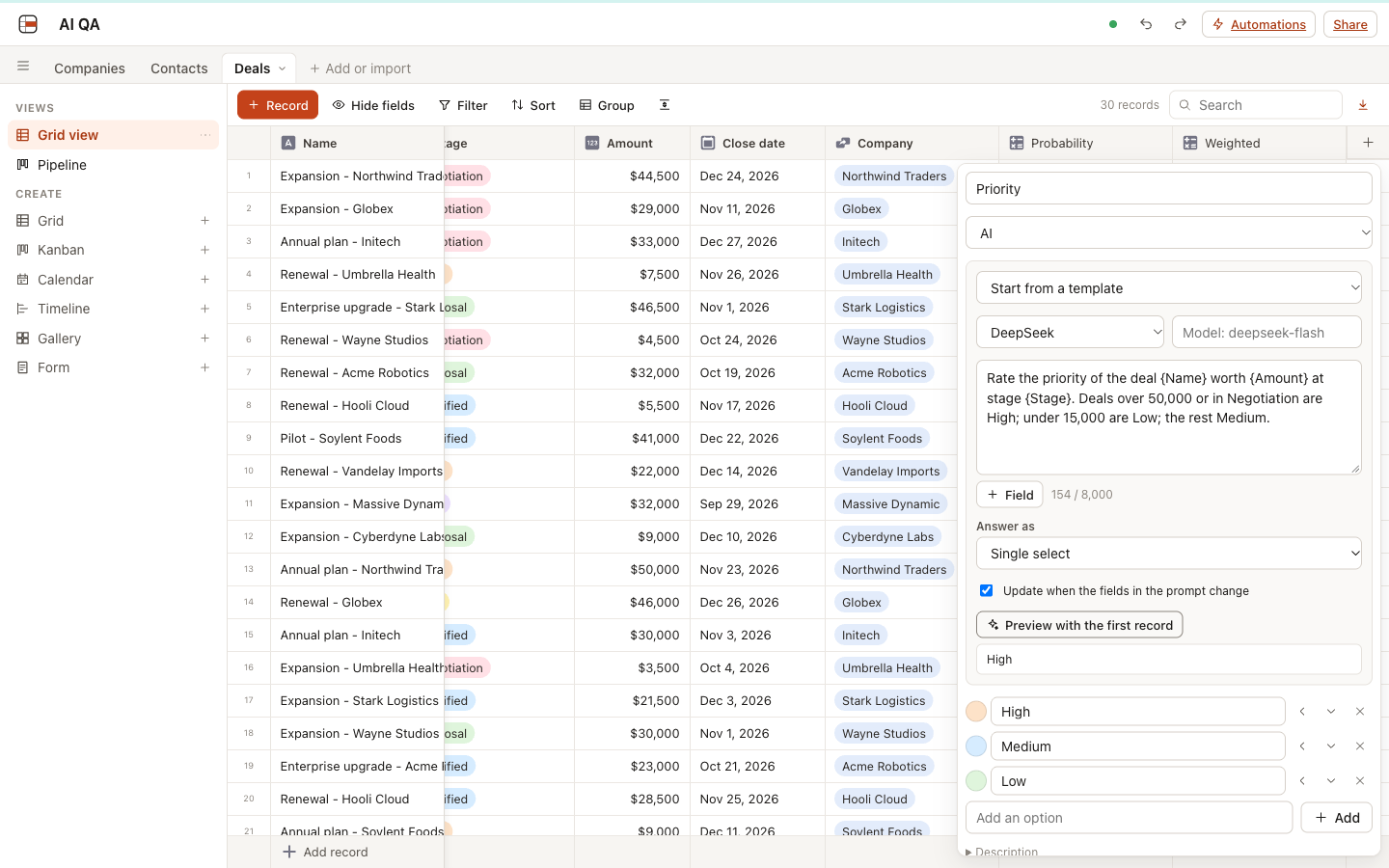
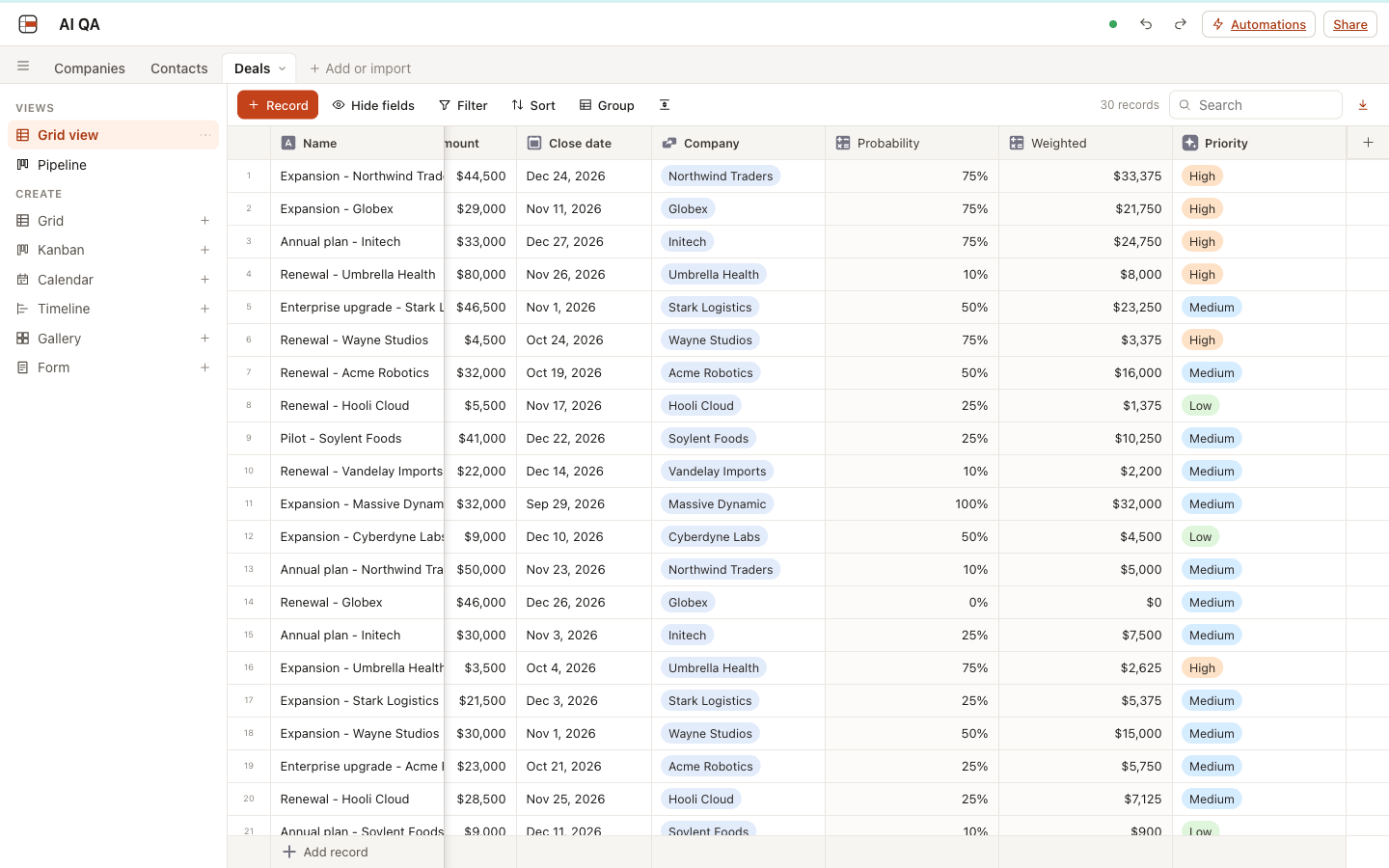
| Classification | “Priority” on 30 deals, single select High, Medium, Low, with a rule in the prompt; the preview answered High; all 30 answers followed the rule (a deal of exactly 50,000 got Medium, since the rule says over 50,000) | Pass | dialog |
| Automatic update | A deal’s amount changed from 7,500 to 80,000: the cell showed Waiting, then High | Pass | grid |
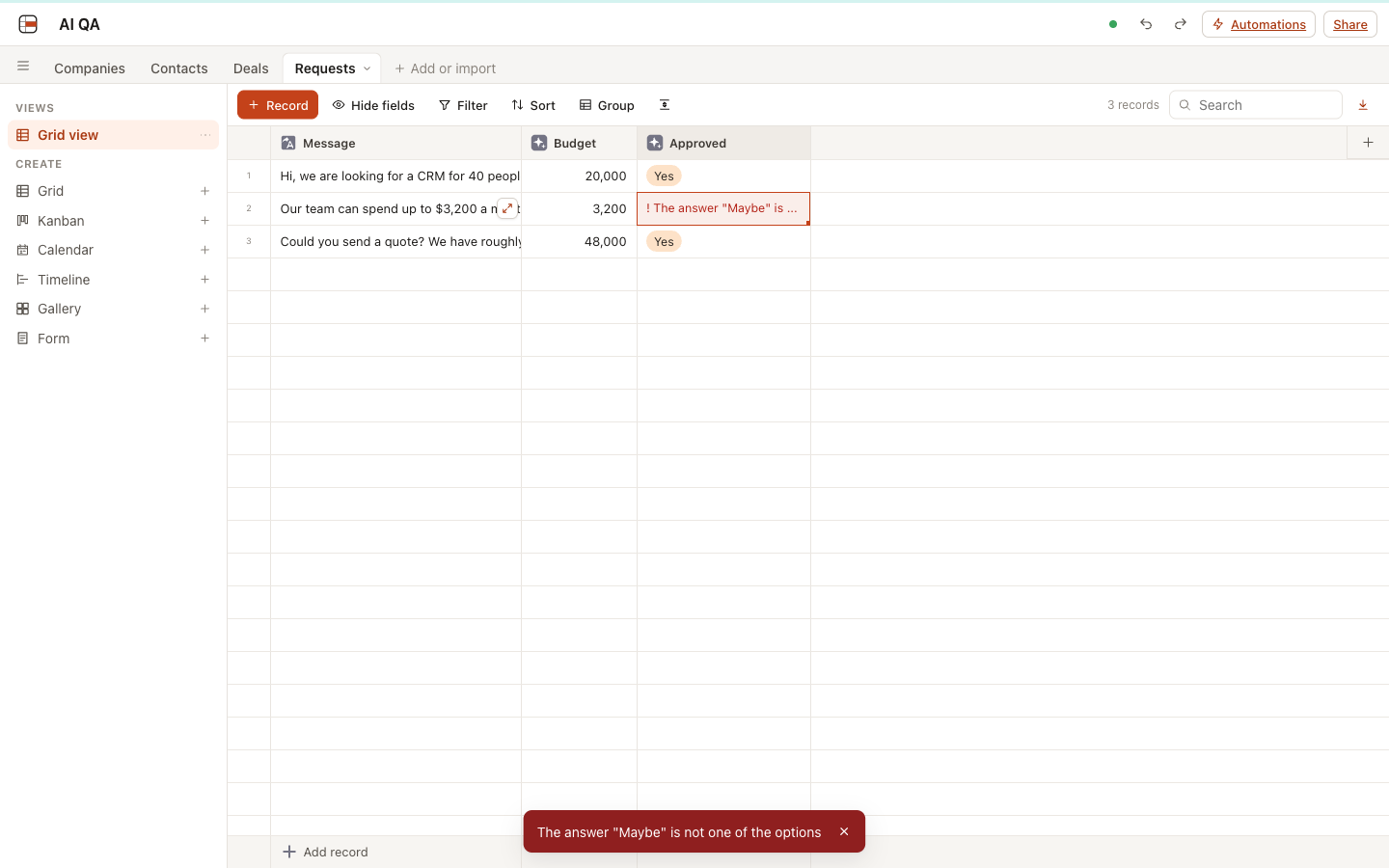
| Numbers | “Budget” read 12,500, 3,200 and 48,000 from “about 12,500 dollars”, “up to $3,200 a month” and “roughly 48k” | Pass | |
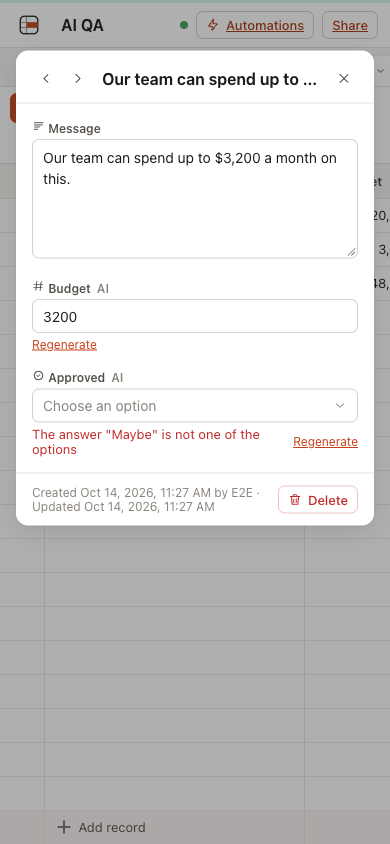
| Wrong answers | A select whose prompt asks for “Maybe”: red “The answer “Maybe” is not one of the options” in the cell and in a message on click | Pass | error |
| Typed by hand | Budget typed as 15,000, then the message changed to 20,000 dollars: the typed value stayed, tinted as edited; Regenerate from the cell menu wrote 20,000 and cleared the mark | Pass | |
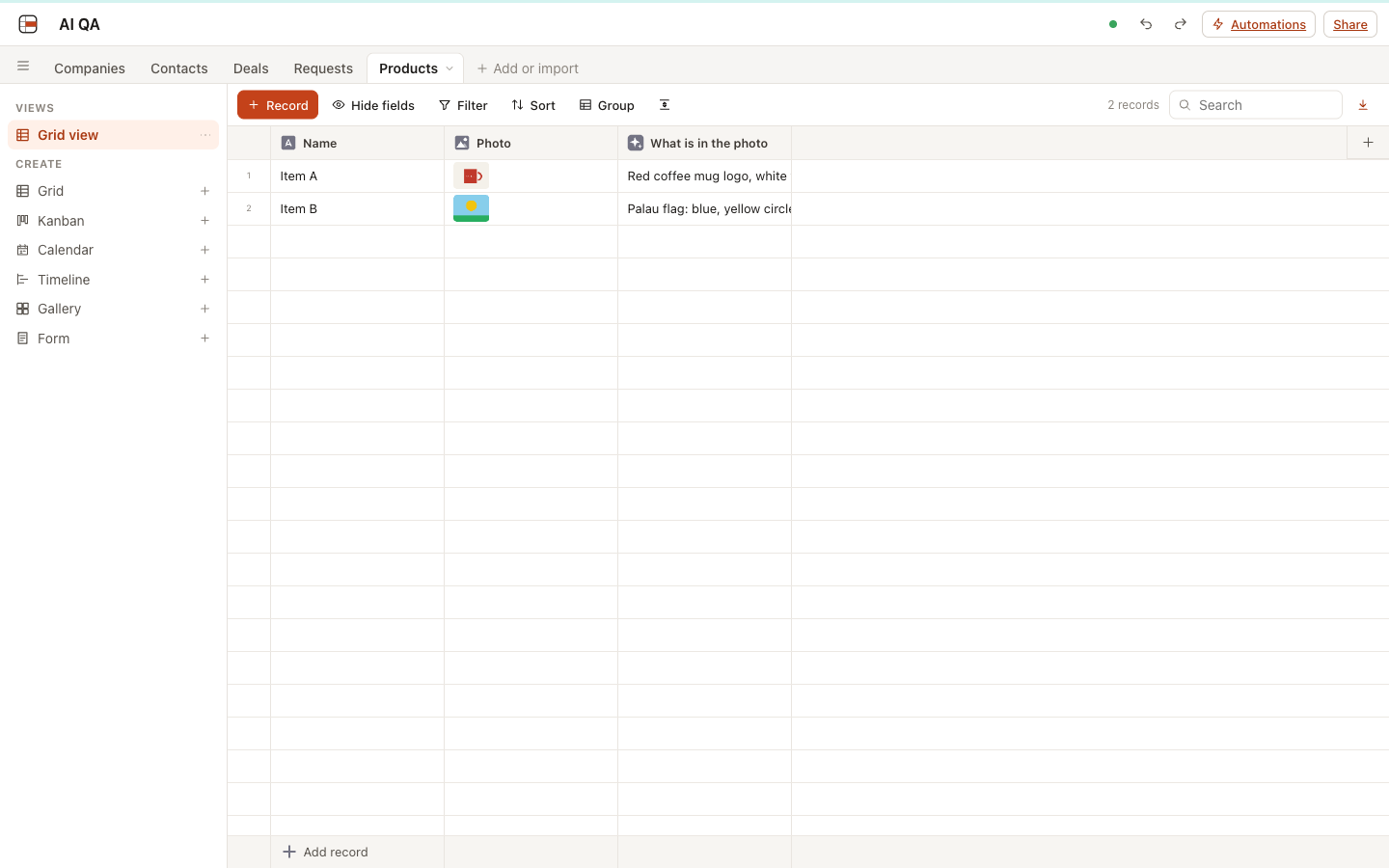
| Images | A drawn red mug and a drawn landscape in an attachment field: DeepSeek answered “Red coffee mug logo, white text” and “Palau flag: blue, yellow circle, green” (the image reached the model; the second reading is the model’s) | Pass | images |
| Stop | 203 records against the fake model, Stop after 30 answers: 36 calls had been made (6 were running), no call in the next 8 seconds, the 6 running answers were dropped and 173 records show as not generated | Pass | |
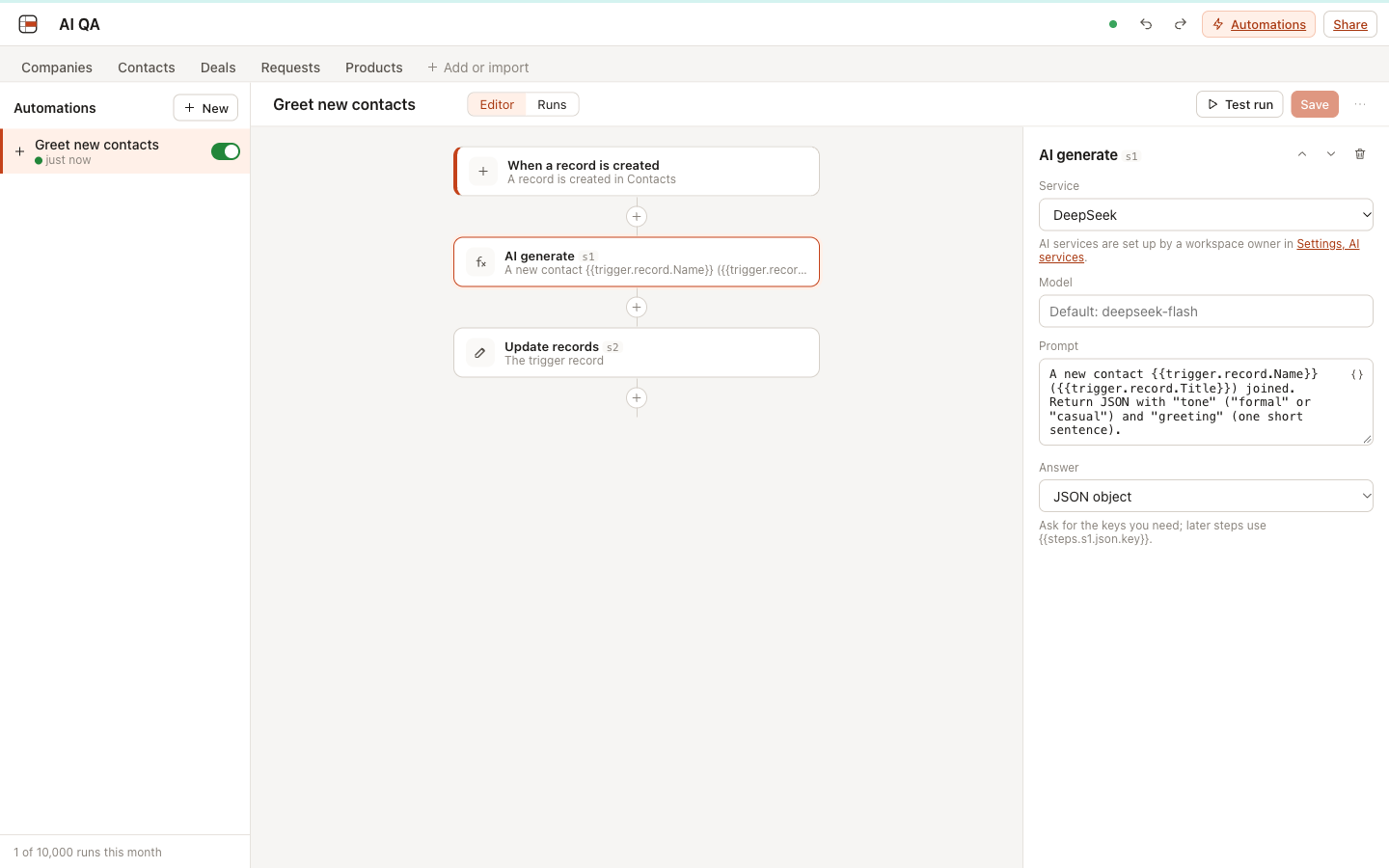
| Automation | Record created, then AI generate (JSON with tone and greeting), then update the record with [{{steps.s1.json.tone}}] {{steps.s1.json.greeting}}: a new contact “Grace Hopper, Rear Admiral” got “[formal] Welcome, Rear Admiral Hopper.” in 1.2 s; the run log shows the prompt and the JSON answer |
Pass | editor |
| Phone | 390 px: the record view shows the AI mark, the error and Regenerate, no sideways scrolling | Pass | phone |
| Docker runtime | Without AUTOMATION_ALLOW_PRIVATE: a service at http://127.0.0.1:9912 is refused (“The service address must start with https://”) and https://127.0.0.1.nip.io is refused (“Requests to private network addresses are not allowed”); with it, an AI field filled from the fake model; Workers AI is not offered |
Pass |
Found and fixed during these checks:
- AI cell text in the grid was squeezed to fit the column; it is now cut with “…”.
- Regenerating a whole column did not show the queued cells as waiting until the page was reloaded; clients now reload the table’s rows after column-wide requests.
- The AI icon in column headers was barely visible; it is now a filled icon.
- In the record view the “AI” mark touched the field name.
Found by the final code review and fixed, each with a failing test first:
- An AI field could read a formula, lookup or rollup that reads the AI field back, so every answer queued the next call without end. Saving such a field (or the formula) is now refused.
- An edit or Stop that arrived while the engine was still looking up the service could be overwritten, leaving the cell on “Generating…” for good. Every step after a wait now checks that the cell was not edited, stopped or queued again.
- A field that reads another AI field which cannot run (a removed service, a rejected key) woke the base every 2 seconds; it now waits as long as the field it reads.
- A new blank record called the model with an empty prompt and stored whatever came back. A prompt whose fields are all empty (and no images) now makes no call, and clears an earlier answer.
- After fixing a field (a new prompt or service), its waiting cells only ran after up to 10 minutes; they now run right away.
- OpenAI’s own reasoning models refuse
max_tokens; requests to api.openai.com now sendmax_completion_tokens. - An owner could point a saved service at another address and the saved key went along; changing the address or kind now needs the key again.
- In the grid, waiting and failed text and number cells could not be typed over; they now stay editable, and an AI column whose prompt refers to a deleted field, or whose service was removed or its key rejected, says “needs attention” in its header with the reason in its menu.
- Found while running the whole suite under load: two drains at the same moment (for example a button’s own run and the alarm) could both run the same automation run, because the run was claimed only after the billing check. It is now claimed first.
Known limits
- A prompt cut at 32,000 characters is still generated; only the preview says it was cut.
- Workers AI sends only the first image of a record.
- Monthly call counts are written once per alarm and can lag by a few seconds; the Workers AI quota is checked against them.
- Answers are not streamed into cells, and records are not batched into one call, so a base generates about 6 answers at a time.
- No spending limit for own-key services; the settings page shows each service’s calls this month.
- Checkbox cells that are waiting or failed are changed from the record view or by pasting, not by clicking in the grid.