Open source · AGPL-3.0 · Self-hosted on Cloudflare
Airtable-style database on your own Cloudflare account.
Pay Cloudflare $5/month, not $20 per seat. Six kinds of views, linked records and formulas, dashboards, automations, AI fields with your own model key and an MCP server for AI clients, with your data in your account.
Rowflare Cloud has a free plan. Deploying requires the Cloudflare Workers Paid plan ($5/month). Why?
What you get
More than a spreadsheet with a database behind it.
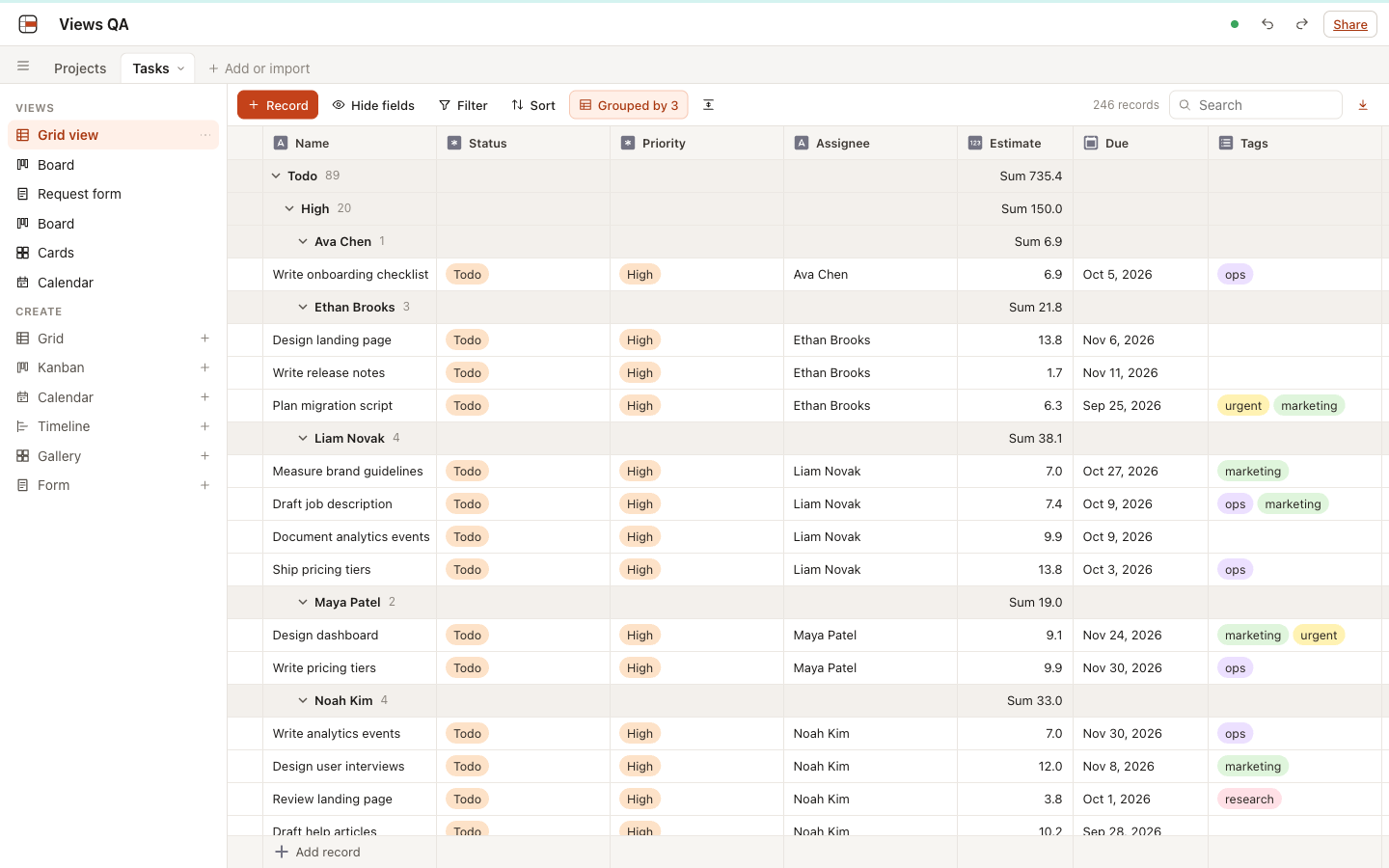
Views
Grid, kanban, calendar, timeline, gallery and form views over the same records.
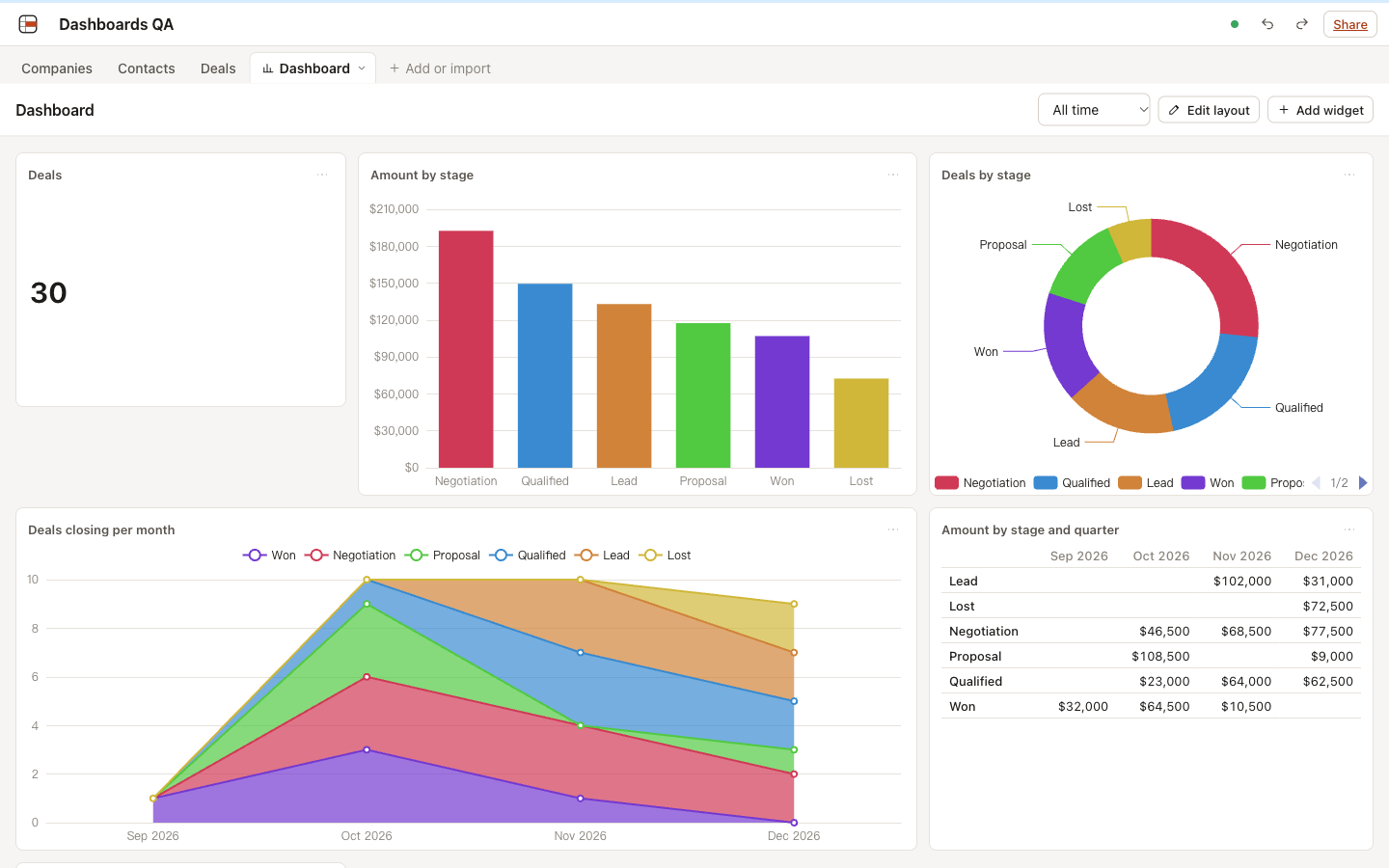
Dashboards
Numbers and charts over any table, computed next to the data.
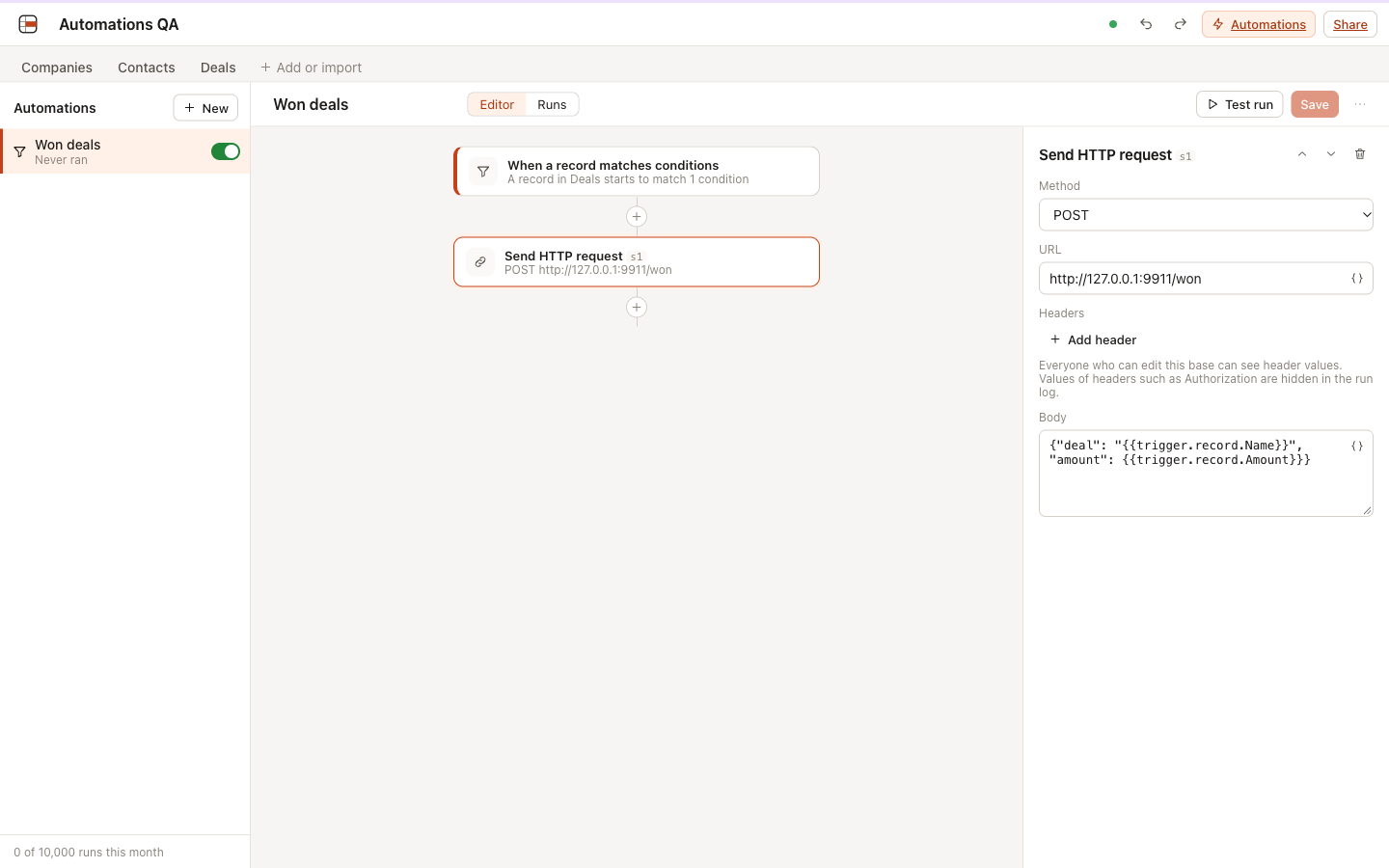
Automations
When something happens in a base, do the next thing for you.
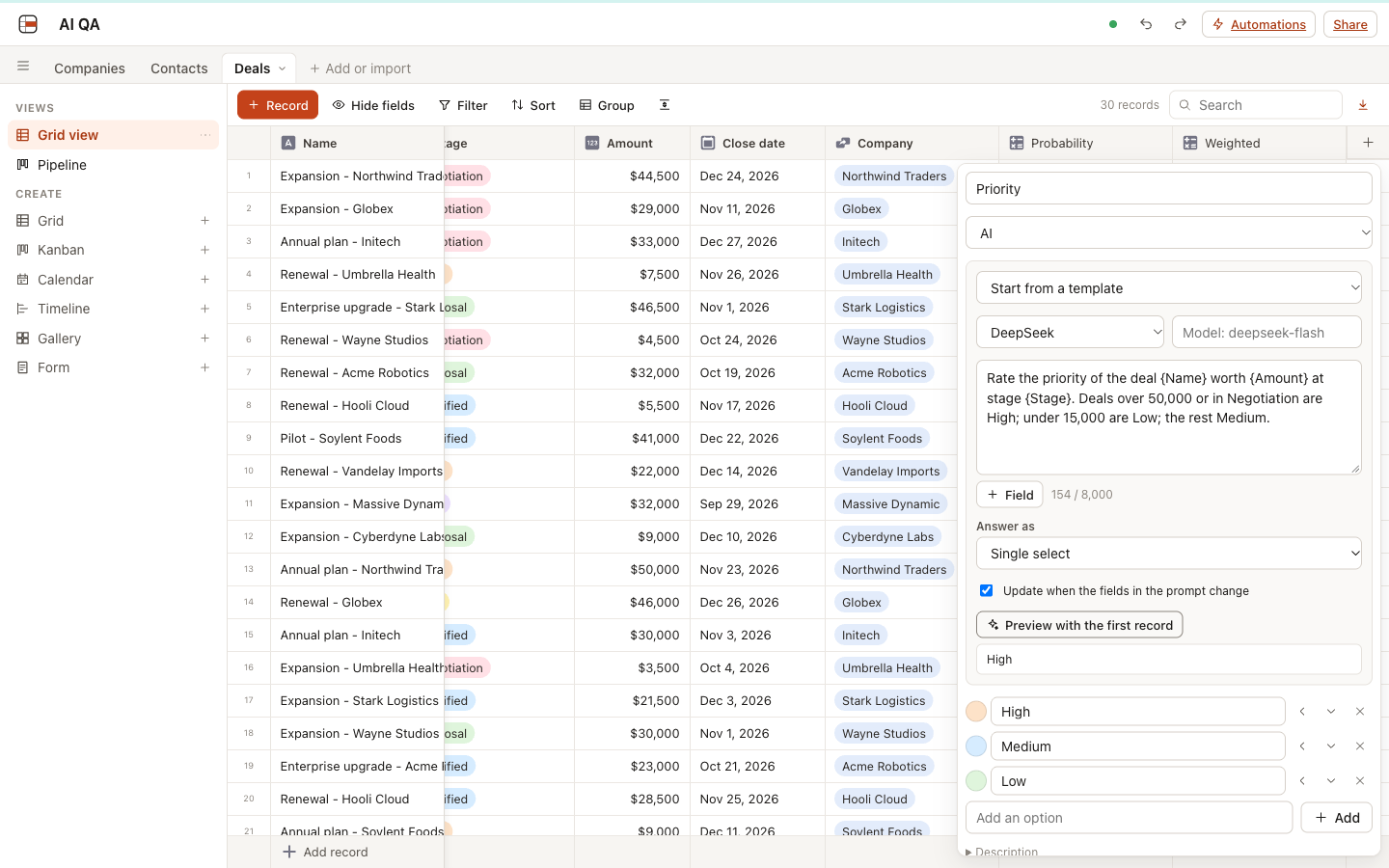
AI fields
Let a model fill a column: summaries, categories, numbers and dates from your records, with your own key.
MCP server
Claude, Cursor and other AI clients work with your bases directly.
Every feature is in every edition, self-hosted included. 686 automated tests and a published test record back each one.
Why Rowflare
Spreadsheet-databases got expensive in two different ways.
Per-seat pricing
Airtable Team is $20 per seat per month billed annually ($24 monthly). A 10-person team pays $2,400 a year; on Business it is $5,400. Rowflare self-hosted costs the Cloudflare Workers Paid plan, from $5/month for everyone.
Paywall creep in open source
Open-source alternatives keep moving features into paid tiers. In 2026-09 Grist removed SSO from its Community edition. NocoDB's community edition uses the Sustainable Use License, which is not OSI-approved.
Servers you have to babysit
Most self-hosted options mean a VPS, PostgreSQL, Docker and backups. Rowflare is one Cloudflare deploy: no servers to patch and no database to run yourself.
How it works
One base = one Durable Object.
- Each base is a SQLite database inside its own Durable Object.Reads and writes run next to the data, in a single thread, so formulas, lookups and rollups update without network round trips.
- Workers serve the app and the REST API.D1 stores accounts and workspaces, R2 stores attachments, a cron trigger handles housekeeping.
- Everything runs in your Cloudflare account.Your data never leaves it. The Rowflare project has no access to your bases and there is no central Rowflare server in the path.
- Real-time over WebSockets.Collaborators see each other's edits live. With WebSocket Hibernation, idle connections are not billed as Durable Object duration.
Performance
Measured, not promised.
Rowflare is designed for 50,000 rows per base (Airtable Team's limit) and supports 125,000 (Airtable Business's limit). Edits stay in milliseconds at both sizes.
| Action | 50,000 rows | 125,000 rows |
|---|---|---|
| Open view, first page | 0.14 ms | 0.36 ms |
| Edit a cell + rollup update | 1.4 ms | 9-12 ms |
| Rename a record + lookup update | 2.3 ms | 5.2 ms |
| Filter by any field | 74 ms | 405 ms |
| Sort by any field | 80 ms | 406 ms |
| Filter + sort | 155 ms | 811 ms |
| Kanban group counts | 125 ms | 730 ms |
| Full rollup recompute | 210 ms | 1,353 ms |
| Full formula column recompute | 575 ms | 2,709 ms |
Features
Everything in every edition.
Views
- Grid with grouping by up to 3 fields and group totals
- Kanban
- Calendar (month and week)
- Timeline with lanes
- Gallery
- Form with a shareable link
Field types
- Single line text
- Long text
- Number, currency, percent
- Single select
- Multi select
- Date, with or without time
- Checkbox
- Attachment (stored in your R2 bucket)
- Link to records
- Lookup
- Rollup
- Formula (Airtable syntax, 89 functions)
- Created time
- Last modified time
- User
- URL
- Phone
- Autonumber
- Button (runs an automation)
Dashboards
- Metric cards with change against the previous period
- Bar, line and pie charts
- Pivot tables
- Shared date range
- Click any number to see its records
Automations
- Record created, updated or matching, schedule, date reached, webhook, button
- Create, update and find records, HTTP requests, email, AI generate, if/otherwise
- Run log, retries, loop protection
- Email through Cloudflare Email Service, Resend or SMTP
AI
- AI fields: text, choices, numbers, dates and checkboxes from a prompt
- Your own key: Anthropic, OpenAI, DeepSeek, Qwen, Kimi, Zhipu, OpenRouter, Gemini, Ollama
- Workers AI without a key on Cloudflare
- Images from attachments for models that read them
- MCP server for Claude, Cursor and other AI clients
Editing
- Real-time collaboration
- Undo / redo
- Copy and paste with Excel and Google Sheets
- Drag to fill
- Keyboard navigation
Data in and out
- CSV import
- Direct Airtable import
- REST API with personal access tokens
- One-click deploy to Cloudflare
- Docker image
Deliberately not doing
- Interfaces / app builder
- An AI chat assistant inside the app (use any MCP client instead)
- Per-seat pricing
- Paywalled SSO, audit logs or permissions
- Bases over 125,000 rows
Open-source promise
What is free today stays free.
Rowflare is licensed AGPL-3.0. Rowflare Cloud (free to start, $29 per workspace per month on Paid) and commercial licenses fund development; they never take features away from the self-hosted edition.
- Features that are open source today never move to a paid tier.
- No per-seat pricing, in any edition.
- SSO, audit logs and permissions are never paywalled.
- The self-hosted edition is the full product under AGPL-3.0, not a demo of the Cloud.
FAQ
Questions
What does Rowflare cost?
Self-hosted Rowflare is free and open source (AGPL-3.0). You pay Cloudflare for the Workers Paid plan, which starts at $5/month for your whole account, with unlimited users. Rowflare Cloud, if you would rather not run it yourself, has a free plan; the Paid plan is $29 per workspace per month with unlimited members.
Why do I need the Workers Paid plan?
The free plan allows 10 ms of CPU per request and 5 million SQLite rows read per day. One filter on a 50,000-row base reads 50,000 rows, so about 100 filters a day would use up the free quota. The Paid plan includes 25 billion rows read per month.
Where is my data stored?
In your own Cloudflare account. Each base is one SQLite-backed Durable Object, attachments go to your R2 bucket and accounts live in your D1 database. Rowflare the project never sees your data.
How big can a base get?
Rowflare is designed for 50,000 rows per base (the same as Airtable Team) and supports up to 125,000 rows per base (the same as Airtable Business). At 125,000 rows filters and sorts take about 0.4 seconds; edits stay around 10 ms.
Can I move from Airtable?
Yes. Import CSV exports table by table, or use direct import with an Airtable personal access token to copy tables, fields, records, links, lookups, rollups, formulas and attachments.
Will features move behind a paywall later?
No. Features that are open source today never move to a paid tier. SSO, audit logs and permissions will never be paywalled, and there is no per-seat pricing.
Is Rowflare made by Cloudflare?
No. Rowflare is an independent open-source project that runs on Cloudflare's developer platform. It is not affiliated with or endorsed by Cloudflare.
How do AI fields work, and who pays for the model?
A workspace owner adds a model service under Settings with their own key: Anthropic, or any OpenAI-compatible service such as OpenAI, DeepSeek, Qwen, Kimi, Zhipu, OpenRouter, Gemini or a local Ollama. Calls are billed by that provider to that key. On Cloudflare you can also offer Workers AI without a key, billed to the Cloudflare account. Keys are stored encrypted and never shown again.
Can AI assistants use my bases?
Yes. Rowflare has an MCP server at /mcp. Connect Claude Desktop, Claude Code, Cursor or another MCP client with a personal access token, and it can query, write and build tables, views, dashboards and automations by name.
Do automations need another service?
No. Automations run inside each base, on Cloudflare or in the Docker image. Webhooks, schedules, HTTP requests and email are built in; email goes through Cloudflare Email Service, Resend or your own SMTP server.
What is not included?
An interface designer / app builder, an AI chat assistant inside the app, and bases over 125,000 rows. These are deliberate scope choices, not paid add-ons.
See it before you deploy it.
Sign up on Rowflare Cloud and start from a template on the free plan.